








Garage golf simulator: The complete guide to building your home setup with Trackman
Your garage sits empty half the time. Your golf game needs work. The math isn't complicated.
A garage golf simulator turns dead space into the most useful room in your house. A place where you can dial in your swing, play Pebble Beach in 4K, and still make it to dinner on time. No tee times. No rain delays. No excuses.
Trackman has spent 20 years building the technology that powers professional golf. The same radar and camera precision used by 90 of the world's top 100 players is now available as a permanent fixture in your home. Here's everything you need to know to build yours.
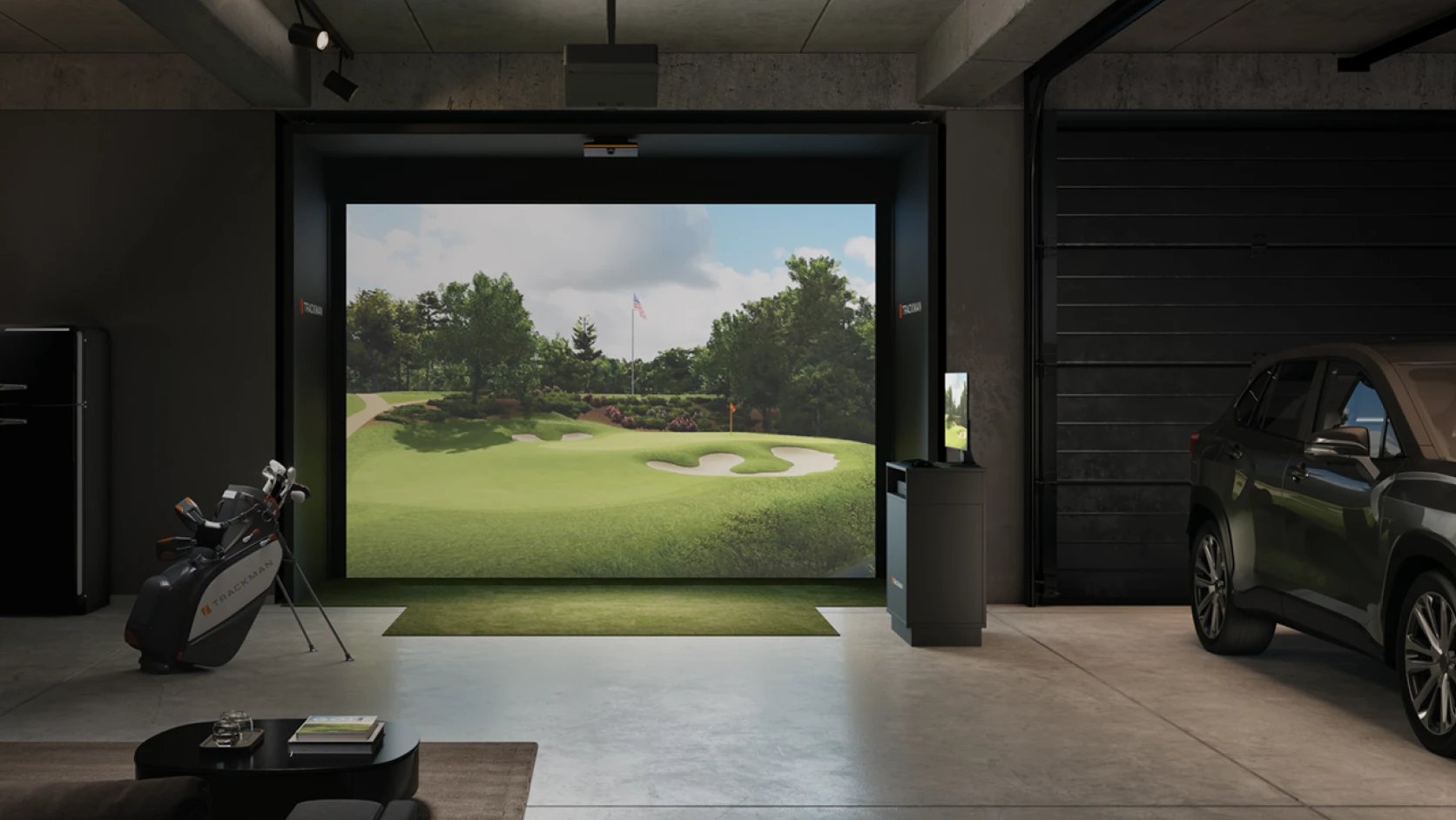
What’s a golf simulator?
A golf simulator is a technology that simulates a real world golf experience by combining hardware, software, and a physical space to swing the golf club. The hardware, the engine of the simulator, is the Trackman 4 or the Trackman iO launch monitor that uses radar and camera technology to track the golf shot and simulate it virtually.
Before the Trackman golf launch monitor was invented just over 20 years ago, golfers and instructors had no real data of a golf shot, and every tweak was made based of the look of a golfer’s swing and the flight of the ball. Trackman revolutionized the game by enabling players and instructors to get accurate and instant data to improve their game. Today, Trackman 4 and Trackman iO is the industry-leading launch monitor and golf simulators.
For a full overview of everything the Trackman golf simulator includes — hardware, software, and build options — visit the simulator overview page.
How Trackman golf simulators work
The iconic orange box leverages radar and camera technology to accurately measure club and ball data such as attack angle, club speed, spin rate, and other key parameters. Trackman 4 gives players insights into more than 40 parameters of a golf shot.
Why the garage is the ideal location
One of the main rooms that customers build a golf simulator into is the garage. It’s often ideal as it’s easy to clear out to make room, it’s private so you can focus on your game, and it’s separate from the house so your smashed drives won’t disturb your family. Other popular choices for putting the simulator are the basement, spare rooms, or a garden shed that can be converted into your personal golf training facility.
Discover how Chris Djuric, a UK-based man with a passion for golf, found a way to balance family and golf by installing a customized Trackman iO simulator in his garage and transforming his UK home into a year-round golf haven.
From Garage to Home Golf Simulator
Choosing between a portable and a garage golf simulator
When picking the right Trackman golf simulator setup for your game, it’s crucial to know what you need. The main thing to decide is whether you need an indoor golf simulator for your garage, or if you need a portable launch monitor that can be used both indoors at home and outdoors on the range.
If you’re looking for a portable launch monitor to bring to the range and use for indoor golf at home, the Trackman 4 is the best solution on the market. Trackman 4 uses optically enhanced radar tracking (OERT) sensors, a radar for short range and one for long range, to be able to deliver the most precise data of your golf shots. Trackman 4 starts at USD 25,495.
Garage space requirements
One of the first and most frequently asked questions when considering a golf simulator is about the room dimensions. Let’s take a closer look at the space requirements below:
Minimum dimensions for indoor golf simulators
For the optimal golf simulator setup, it is recommended that your indoor area has a min. ceiling height of 9-10 ft, a width of 10-15 ft and a depth of 15-20 ft. The dimensions are important, since they directly impact both performance and safety. Without enough space, your swing can feel cramped, and there’s a higher risk of damaging the walls or your golf equipment.
Space requirements by setup type (Trackman iO vs Trackman 4)
The Trackman iO is mounted to the ceiling, therefore you’ll need less depth, since there is no unit behind you. If you’re choosing the Trackman 4 Launch Monitor for your home golf simulator, you’d need more room depth for the launch monitor to deliver the most precise data on your shots from behind you.
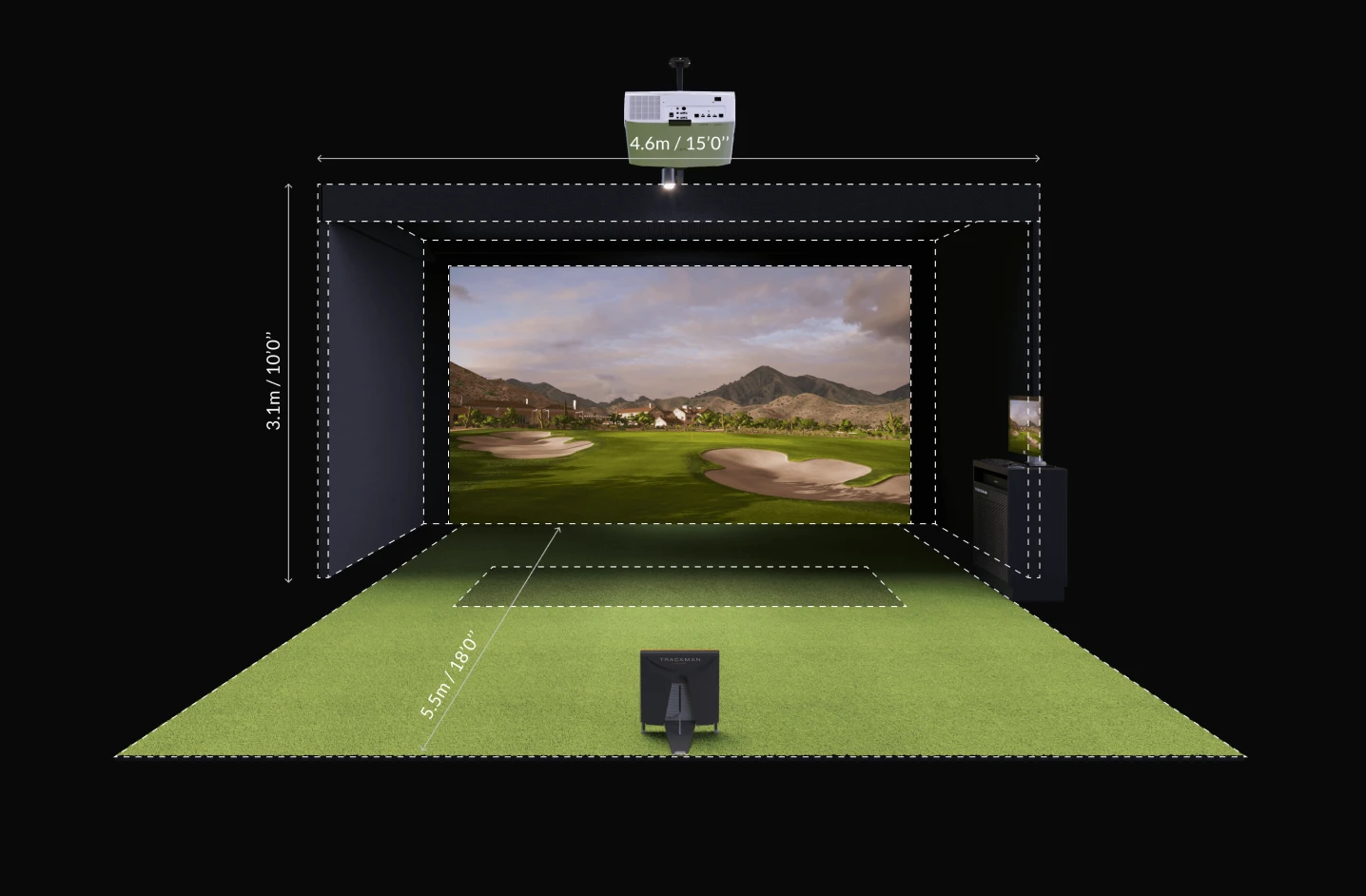
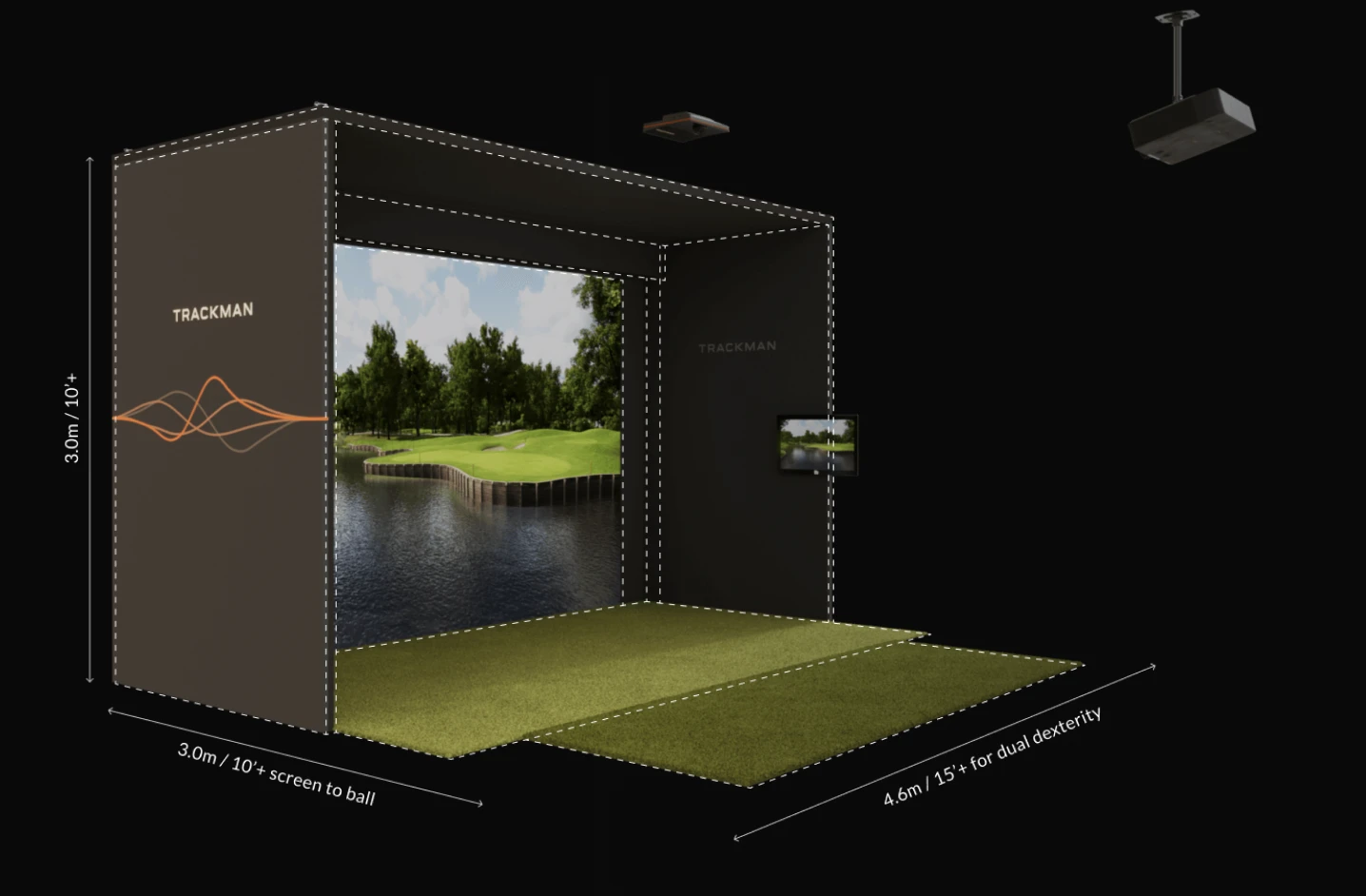
Read more details about the space requirements for each launch monitor here.
Working around obstacles
When setting up a golf simulator it is crucial to avoid space where doors, beams or storage will be in the way of the simulator. Remember to limit the amount of windows in your golf simulator space. Your golf balls will be flying!
Before ordering your launch monitor, make sure the room is ideal for your setup. We’re happy to help! Talk to a Trackman expert today to get guidance.
Essential equipment for a garage golf simulator
Beyond the launch monitor there’s a number of additional features for your Trackman simulator. Let’s dive into each of them, and how they affect your virtual experience:
Impact screens and enclosures
Impact screens are both made to project surfaces and as a safety barrier. They absorb the high-speed golf balls, while displaying the virtual golf course. Enclosures are the frame or netting that surrounds the screen to contain the mishits and reduce any bounce-back balls. They’re both vital features for improving the safety of your setup.
Hitting mats
A high quality golf hitting mat is an essential component for a more realistic setup. It mimics the feel of real turf, can help reduce strain on your joints, and protect the floors from marks and scratches. Hitting mats can also help you strike the ball in a reliable and repeatable way when you swing.
Projectors
A good and reliable golf simulator projector can bring your desired practice golf course to life. Look for a projector with high resolution and a brightness feature to deliver a sharp, clear image on your screen. For the best results, a 1080p (Full HD) resolution is considered the standard. However, a 4K projector is the ideal choice for vibrant details, sharper visuals and the most realistic course display. The better the projector quality is, the more immersive and enjoyable your golf simulator experience will feel!
Simulator software
Advanced golf software is the heart of your system. It converts the tracked ball data into meaningful visuals, simulates the courses, and provides you with detailed information and analytics to help improve your game. The Trackman simulator software options deliver highly accurate shot tracking and a wide range of game modes. With Trackman, the software is designed specifically for our own launch monitors, therefore it’s not compatible with other units on the market. It works within the Trackman systems only.
Computers and connection
A powerful computer is essential to run your indoor golf simulator smoothly. You’ll need fast processing for a highly active and responsive indoor golf game. A stable internet connection is also a must for software updates, online features and accessing cloud-based services within the Trackman system.
Trackman protection
If you need protection for your Trackman when moving it around, a protective sleeve is a great choice. Avoid bumps, scratches and general wear during movement by transporting your Trackman in a protective sleeve.
How much does a Trackman golf simulator cost?
Having a functional indoor golf setup is an investment in your game. However, it is possible to divide the setups into three tiers, which gives you a clear overview of the various options.
Cost-effective setup
The cost-effective Trackman setup provides an opportunity to bring a world-class golf simulator into your home. The Trackman iO is the best option starting at 13.995 USD with an additional cost of 700 USD a year for the software subscription. Enjoy a fully functional golf simulator with the best fundamental features at home, perfect for golfers who want top analytics with minimal upfront hardware cost.
Mid-tier setup
A mid-range option features the Trackman 4, starting at 25.495 USD with an additional 1.100 USD per year that pays towards the software subscription. This Trackman flagship dual-radar launch monitor works both indoor and outdoor. It’s used by pros and coaches world-wide. The best option for players and coaches who want the most comprehensive ball and club data for serious training or performance improvement.
The complete setup
What truly completes this setup, is the custom-built feature. By tailoring every element to your space, Trackman ensures your simulator not only fits perfectly, but also performs at its best. It varies in price depending on your needs. At Trackman we partner with specific premium retailers and manufacturers to include high-quality, third-party equipment in our custom built simulator packages. This approach creates a reliable, custom and fully optimized golf simulator experience.
The complete setup also pairs your Trackman launch monitor with software and hardware subscriptions. The newest software subscription for the setup will give you full access to more than 500+ different virtual golf courses, games and advanced practice tools. By leveraging the optimal data from every swing, shot and course scenario, this simulator setup delivers highly accurate insights to help improve your game faster. Meanwhile the hardware subscription gives you the premium support benefits, if something in your golf simulator setup needs repair or maintenance.
If you’re interested in a custom solution, try our online Sim Builder.
Step-by-step: Setting up your garage golf simulator
Step 1: Plan your space
Before you begin unpacking your Trackman launch monitor, measure your indoor space carefully. It is recommended to have the following dimensions:
Ceiling height: 9-10ft minimum
Width: 10 ft minimum
Depth: 15-20 ft
Make sure you keep your ceiling, walls, and floor clear of obstructions. The sensors in your Trackman will need an unobstructed view to gain accurate data.
Step 2: Install the hitting mat
The basics of your simulator is the hitting mat. It gives you more secure footing and ball touch.
Place it at the center of your swing zone.
Ensure the mat is level and stable enough, so it won’t disrupt your swing.
Step 3: Mount the impact screen and enclosure
The impact screen is vital. It’ll show you every shot of the game in virtual detail.
Attach your impact screen to the frame of your golf simulator. It is also recommended to build or install enclosures.
Add side or top panels to protect your indoor garage walls from flying balls!
Step 4: Position the Trackman launch monitor
The very core of your simulator is your Trackman launch monitor device.
Place your Trackman iO in the ceiling, or Trackman 4 directly behind the ball. It should be aligning with your target line.
Make sure there’s no reflective surfaces nearby, such as glass, big fans or polished metal. These surfaces can interfere with your radar readings.
Plug your Trackman into a computer that is powerful enough to run the software and graphics smoothly.
Step 5: Connect software and subscriptions
Trackman is more than just hardware. We offer a complete Trackman system!
Install your Trackman Software on your computer.
Log into your personal Trackman account and connect your Trackman unit to activate your software license. Here you will gain access to a broad range of virtual courses, games and more data tracking.
Make sure your hardware subscription is active for priority support and maintenance coverage.
Step 6: Set up visuals and audio
Your simulator experience can feel incomplete without visuals.
Position the projector so it is showing the visuals on the impact screen.
Add a speaker system for realistic course sounds. This will without a doubt make your golf experience even more immersive and enjoyable.
Garage specific considerations
Once you have the Trackman setup functioning, other factors such as indoor climate, lighting and safety, are important to have in mind.
Climate control
Having an indoor interactive golf course lets you play anytime, regardless of the weather. However, the indoor climate can affect the quality of the game. More precisely the room temperature and humidity can affect your swing, and performance.
Temperature can impact your swing and performance. While hitting golf balls indoors the temperature can increase, so a lower temperature might be preferred.
Humidity can affect your performance or the club grips. Consider a dehumidifier if your garage tends to get moist.
Ventilation can be a great optional addition to the room to ensure airflow. It keeps the room more comfortable for you, so you can enjoy long practice sessions.
It is important to remember that maintaining the optimal conditions in the indoor environment will ensure a better experience.
Lighting
Proper lighting in the garage ensures safety, accurate visual tracking, and a comfortable playing experience. Even lighting is one of the most important features. Harsh shadows won’t interfere with the sensors, but it might interfere with your swing or visuals on the screen. Adjustable options like LED strip lighting and overhead spotlights are recommended, because they allow you to find the right amount of even light in your indoor space. When selecting the correct lightning, LUX is very important please consolidate with a Trackman expert for specific guidance.
Safety considerations
A golf swing can generate high-speed, so safety is a necessity in smaller spaces like garages.
Screen and enclosures are used to prevent balls from damaging walls, windows or the garage doors.
A hitting mat is required to protect your swing and setup.
Clearance of the ceiling is a must! Make sure objects or storage units above your head are out of the swing path - can you and your buddies swing a driver freely?
Distancing yourself to the walls is also important to make sure your swing won’t hit anything. Be sure you have enough room around you, even for your most powerful swing!
Trackman garage simulator options
To find the absolute best garage golf simulator for you, Trackman has a few different options to consider. Trackman 4 is the gold standard in golf. It is adopted by thousands of coaches and clubs, and is the go-to solution by 90 out of the top 100 players in the world. However, the Trackman iO may be a more optimal solution if you already have access to Trackman Range in your club and are looking for the best indoor golf simulator available for your home.
Like Trackman 4, the Trackman iO uses radar and high speed camera technology to pull club and ball data from a golf shot. It differs from the portable Trackman 4 by being a built-in solution for your home. With the iO, you can immerse yourself in Trackman Virtual Golf 3, the most realistic gameplay that enables you to play top courses in 4K - right there in your garage, basement or elsewhere in your home.
Trackman iO is available as a complete home solution with two different configurations; the Custom Integrated Build and the Standalone Flex Cage.
Trackman iO Custom Integrated Build

The Trackman iO Custom Integrated Build is the ultimate golf simulator setup for your garage, basement, or a dedicated room. Starting at USD 47,990 including installation, the Custom Integrated Build is a tailored solution that is seamlessly built into your room of choice. This build-out is for golfers who want to permanently dedicate space for their simulator to get the most complete indoor golf experience available in the world.
Trackman iO Standalone Flex Cage
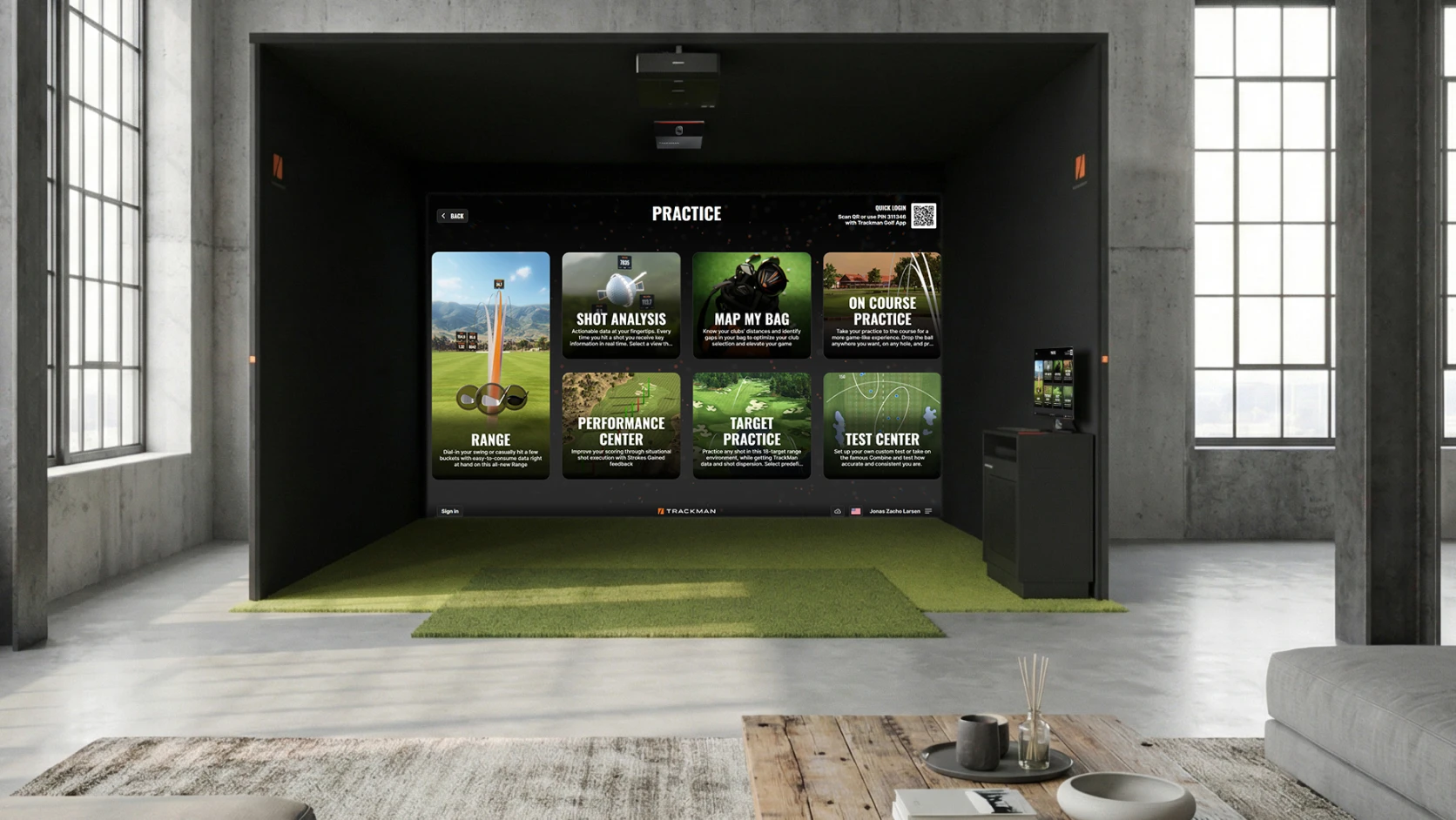
The Trackman iO Standalone Flex Cage is an easy to install solution that can be used as a short or long-term golf simulator. The Flex Cage is modular and movable so you can change your mind later and move it to another area. It’s great for players who want to get started with their golf simulator as quickly as possible without having to plan where to permanently build in the tech. The Standalone Flex Cage including installation starts at USD 43,995.
Head over to our Sim Builder to start designing your dream golf simulator setup.
Trackman iO Tech Setup—a DIY golf simulator
At Trackman, we’ve spent 20 years of engineering perfecting our military-grade radar technology. Put in another way, it would be difficult for you to develop the technology for a homemade golf simulator. However, it’s definitely doable to build the setup around the tech.
That’s why we offer the Trackman iO Tech Setup in addition to the Integrated Build and the Flex Cage.
The Trackman iO Tech Setup is for the handy golfer who’s looking for a DIY golf simulator solution. Starting at USD 20,000, the Tech Setup pack includes the Trackman iO launch monitor, computer and projector. With all the essentials included, the Tech Setup allows you to design your very own DIY golf simulator setup around the Trackman iO device.
Using our Sim Builder, simply choose Tech Setup as your build-out option to get started.
If you’re looking for inspiration on how this could look, check out some of our previous builds.
Garage golf simulator ideas and inspiration
It can be hard to imagine your perfect golf simulator space. However, there are endless options when it comes to setting up your Trackman!
Explore our gallery of golf simulator garage conversions and discover how many others have created their ideal indoor setups. Get inspired by our many satisfied customers and read their success stories here.
Frequently asked questions
How much ceiling height do I need?
For an indoor golf garage simulator, you are required to have at least 9 ft of ceiling height, or enough space to swing your driver freely. This is the optimal measurement, as it helps ensure full swing clearance, accurate ball flight, and a safe playing environment.
Can I use my garage for parking and a simulator?
Yes, as long as you bear in mind that the simulator can’t have any obstructions in front of it while you are playing. If your garage is short on space, you might have to move the car to create enough room while playing.
Make sure your car isn’t positioned where it can get damaged! If you park your car near the simulator, there’s a chance it could be hit by bounce-back balls.
How much does a golf simulator cost?
The Trackman iO is Trackman's most cost-effective launch monitor and it starts at 13.995 USD. A more advanced setup with the Trackman 4 begins at 25.495 USD. Fully equipped installations begin at 40.000 USD.
Why is Trackman 4 so expensive?
The cost of a Trackman 4 reflects its quality and advanced technology. It combines dual radar and camera systems to deliver highly precise, professional data on both ball flight, club and body motion. Additionally, Trackman 4 is a portable system designed for both indoor and outdoor use.
Read “The Trackman price explained” here for more information.
What is the difference between Trackman iO vs Trackman 4?
The Trackman iO is a ceiling mounted launch monitor ideal for compact indoor spaces. In contrast, the Trackman 4 is a portable and retractable golf simulator option made for both indoor and outdoor use. If you are using the Trackman 4 indoors, you will need more depth for the launch monitor to track your shots.
The price of each monitor varies. Trackman iO is the least expensive option, while the Trackman 4, due to its more advanced system, is a bigger expense.
Read more about Trackman 4 or the Trackman iO.
Do I need extra ball or club markers to use Trackman iO or Trackman 4?
Compared to other launch monitors Trackman doesn't require additional markers on either the club or ball in order to track with full accuracy. This makes it very convenient compared to alternative launch monitors.
Does Trackman iO and Trackman 4 work in all weather conditions?
Both launch monitors work in all weather conditions and track performance day or night—whether in sun, rain, snow, or fog. So it makes no difference whether you are using the launch monitors indoors or outdoors.
Does Trackman 4 track the full ball flight or only launch data?
Trackman 4 is one of the only launch monitors that tracks the entire ball flight when used outdoors. That means no guessing. Many alternative launch monitors only track the initial launch data and guestimate the rest of the ball flight, even outdoors. We have tracked more than a billion full flight golf shots—another reason why we know exactly how the ball flight should be, both outdoor and indoor; it's all based on the data.
You can explore the full range of Trackman golf simulator options — from hardware and software to complete build-outs — on the simulator overview page.
Want to know more?
Fill out a contact form to get in touch with a Trackman expert today.